Your Cart is Empty


AutoBoat USA
Pre-Order Available. ETA September/October 2026
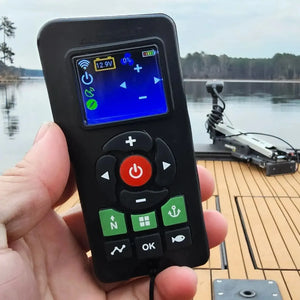
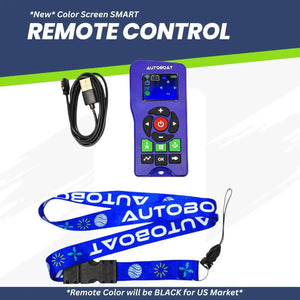
The new AutoBoat Smart Head Remote is here. This is the full-featured, color-screen, rechargeable remote that will be included with all AutoBoat Smart Head units sold in the United States going forward—and it's also available as an upgrade if you already own a Smart Head and want the newest controller.
https://drive.google.com/file/d/1tsKAio6JbXMWN1X0an8mjJg8S4dPD_w4/view?usp=sharing
The remote charges using an included magnetic charger on the side and can be powered from any standard USB outlet 1 amp output or less (power brick, computer USB, or a USB port on your boat electronics).
DO NOT USE ANY AFTERMARKET CHARGING CABLES FOR THE SMART REMOTE!
If you need an extra or replacement charging cable click HERE
Use the included charging cable with correct polarity for charging the Autoboat Smart Remote. Use only charging bricks or power adapters with 1 AMP max output. Do not use with any charging device over 1 AMP
***Use of any other charging cables, such as ones found on Amazon or other retailers, will not be covered under warranty. ***
Press the N button to enter Navigation / Nav Point Mode. This mode is designed to keep you traveling in a straight line—the Smart Head continuously corrects for wind and current to maintain course as best as possible.
Press the Tracking button (lower left) to access tracking. A red tracking icon appears when enabled.
Press the Fish icon button (lower right) to drop a fishing waypoint instantly—no need to open the app and tap the map to mark a spot.
Press the Anchor button to enter Anchor Mode (often called Spot-Lock). Press it again to turn Anchor Mode off.
Three Anchor Mode profiles are available and can be changed directly from the remote while in Anchor Mode. When prompted, press OK to cycle between:
AutoBoat is an all-in-one unit and does not use a separate boat-mounted heading sensor to determine which way your boat should face. When you activate Anchor Mode, the system pins a GPS location and works to keep the boat within a few feet of that spot.
For the most accurate Anchor/Spot-Lock placement, get the boat as still as possible before activating Anchor Mode. If you hit Spot-Lock while moving, the pinned point may land behind/offset from where you intended as the boat slows and swings with wind/current.
AutoBoat was designed primarily to be mounted on the front of the boat (pulling the boat). You can mount it on the rear, but behavior changes:
This remote only works with AutoBoat Smart Head units (not the older Gen One AutoBoat / legacy black box systems).
To access the menu from the main screen, press the Power button to show the Menu icon, then press the Menu button.
You can calibrate two ways:
After successful calibration, the compass icon turns green. GPS signal may vary indoors/buildings.
This Smart Remote supports firmware updates through the AutoBoat app:
Splash resistant, not submersible. Do not dunk or submerge this remote. If it gets splashed, dry it off promptly. Water submersion damage is not covered under warranty.
Heads up: A foot pedal and 24V system support are in development, but timelines are not confirmed.
Works perfectly... larger size fits my hand better, than the original smal one
Big improvement over my previous (black) remote. Very convenient to see the set speed. Ability to recharge is a big plus. Autoboat is definitely moving in the right direction with development of this product.
Absolutely Love the Smart Remote. I'm a 76 year old boomer so I haven't utilized all that it can do but piloting, navigating, anchoring and the "N" functions were seemless on my first run out this morning. So easy to handle and understand. I'm looking forward to enjoying all that it can do.
Works great.
Awesome remote.. a big advantage compared to my old remote..
Works well. Nice to see the speed setting.
This new remote is a game changer. I can now see what power level I am and my battery level in the screen.
It was pretty easy to setup, do a firmware update and calibration. So far so good. I do like this remote over the blue one that came with my smarthead. Love being it is rechargable over having to open it up to change a battery like in the original remote.
Want to upgrade from the blue remote. Does this by chance have a prop on and off button like the MK remotes where you can shut off your prop and turn it back on with the speed you were going before?
Hello Jeremy,
No, you would have to hit the "down" button to slow the prop down then the "up" button to get back to the setting. Thank you